Updated July 2026
If your hand measures more than 19 cm from wrist crease to middle fingertip, most “ergonomic” mice are too small for you — and the marketing won’t tell you that. The spec that decides this purchase isn’t DPI or button count; it’s physical size: you want a body at least 120 mm long and tall enough (45 mm+) that your palm rests on the mouse instead of hovering over it. By that number, the Logitech MX Master 3S (124.9 mm long, 51 mm tall) is the buy for most large-handed people, with the Logitech MX Vertical the pick if your wrist already hurts.
The spec that matters: length and height, in millimetres
Mouse makers love the word “ergonomic” and almost never publish a hand-size chart. Here’s the translation. Grip an undersized mouse and your fingers curl into a claw, your palm floats, and the small muscles of your hand do work your arm should be doing. For hands 19–21 cm long you want roughly 120–135 mm of mouse length, 75 mm+ of width, and enough dome height that the heel of your palm is supported. Every pick below lists the manufacturer’s real dimensions so you can check against your own hand before you buy. That’s the whole decision — everything else (sensor, wireless, buttons) is a tiebreaker.
Small-handed? You want the opposite list — see our best ergonomic mouse for small hands guide.
1. Logitech MX Master 3S — the buy for most large hands
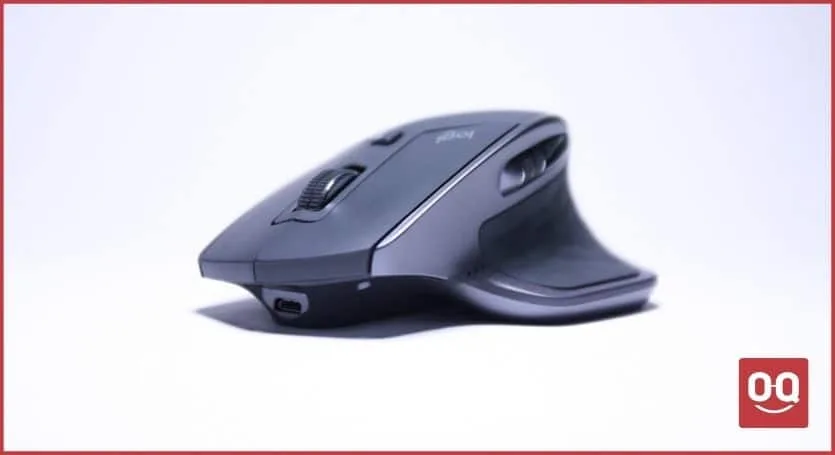
Dimensions: 124.9 × 84.3 × 51 mm, 141 g. The MX Master 3S is one of the few mainstream productivity mice actually sculpted for a full palm grip: the 51 mm dome fills a large palm, the thumb shelf takes the weight of your thumb instead of letting it drag on the desk, and the sloped right edge gives your ring and pinky fingers somewhere to live. The 8,000 DPI sensor tracks on glass, the quiet clicks are office-safe, and the MagSpeed scroll wheel free-spins through long documents — genuinely useful, not gimmick. Battery is rated up to 70 days.
Buy it if: your hand is 19 cm or longer and you palm-grip all day for work.
Skip it if: you game competitively — 141 g is heavy for flick aim — or you want a cheaper starting point.
Check Logitech MX Master 3S on Amazon
2. Logitech MX Vertical — buy if your wrist already hurts
Dimensions: 120 × 79 × 78.5 mm, 135 g. The MX Vertical rotates your hand to a 57° “handshake” angle, which takes the twist (pronation) out of your forearm — the mechanism behind most mouse-related RSI complaints. Crucially for this list, it’s a genuinely big vertical mouse: 78.5 mm tall with a wide grip surface, so long fingers wrap it instead of dangling off the end like they do on compact verticals. Expect a two-or-three-day accuracy adjustment period; that’s normal for any vertical.
Buy it if: you have wrist or forearm pain and a hand 19 cm+.
Skip it if: you do precision work (photo editing, CAD) — the vertical grip trades some fine control.
Check Logitech MX Vertical on Amazon
3. Razer Basilisk V3 — the gaming pick
Dimensions: 130 × 75.4 × 42.5 mm, 101 g. Gaming mice have chased ultralight tiny shells for years, which is great for 17 cm hands and miserable for 20 cm ones. The Basilisk V3 is the exception: at 130 mm it’s one of the longest mainstream gaming shapes, with a deep thumb rest and a pronounced hump that supports a palm grip through long sessions. You get a 26K sensor, 11 programmable buttons, and — at 101 g — enough mass to feel planted without feeling like the MX Master. For more shapes like this, our gaming mouse guides go deeper.
Buy it if: you want one large mouse for gaming and work, wired.
Skip it if: you need wireless — look at the Basilisk V3 Pro instead, same shell.
Check Razer Basilisk V3 on Amazon
4. Kensington Expert Wireless Trackball — the wildcard
Dimensions: 155.9 × 149.9 × 57.2 mm. Here’s the contrarian option: stop moving the mouse entirely. A trackball can’t be too small for your hand because your hand never grips it — you rest your palm on the wide base and roll the 55 mm ball with your fingers. Zero reaching, zero shoulder travel, and the Expert’s four big buttons and scroll ring are easy to hit with large fingers that mash smaller trackballs. It-depends by design: the learning curve is real (give it a week), but for big hands with limited desk space it’s the most comfortable device on this page.
Buy it if: desk space is tight or shoulder/elbow pain is your problem.
Skip it if: you game, or you won’t tolerate a week of retraining.
Check Kensington Expert Wireless Trackball on Amazon
The one to skip: Logitech Lift
The Lift shows up in a lot of “ergonomic mouse” round-ups, and it’s a good mouse — for the wrong hands. At 108 × 70 × 71 mm it’s explicitly designed for small-to-medium hands (Logitech says under ~19 cm). If your hand is large, your fingers overhang the front and the ergonomic benefit evaporates. Skip it and buy the MX Vertical, which is the same idea sized for you.
| Pick | Best for | Why it wins | The catch |
|---|---|---|---|
| Logitech MX Master 3S | Most large hands, all-day work | 124.9 × 84.3 × 51 mm sculpted palm-grip shell | 141 g — too heavy for competitive gaming |
| Logitech MX Vertical | Wrist/forearm pain | 57° handshake angle, 78.5 mm tall grip | Adjustment period; less precise |
| Razer Basilisk V3 | Gaming | 130 mm long, deep thumb rest, 101 g | Wired only |
| Kensington Expert Trackball | Tight desks, shoulder pain | Hand never grips it — size stops mattering | A week of retraining |
| Logitech Lift | Skip (large hands) | — | Sized for hands under ~19 cm |
How to measure your hand (30 seconds)
Measure from the wrist crease to the tip of your middle finger. Under 17 cm is small, 17–19 cm is medium, 19 cm+ is large, 21 cm+ is extra-large — at which point the MX Master 3S and Basilisk V3 are your realistic mainstream options, and the trackball starts looking very sensible. Pair whichever you pick with a sane desk height; a mouse can’t fix a wrist bent upward all day (related: is a wrist rest actually necessary?). More mouse guides live in our mouse section.
FAQ
What size mouse do I need for large hands?
For a hand 19 cm or longer (wrist crease to middle fingertip), look for a mouse at least 120 mm long, around 75 mm wide, and 42 mm+ tall so your palm is supported. The Logitech MX Master 3S at 124.9 × 84.3 × 51 mm is the benchmark shape.
Are vertical mice good for large hands?
Only the full-size ones. The Logitech MX Vertical (120 mm long, 78.5 mm tall) fits large hands well; compact verticals like the Logitech Lift (108 mm) are designed for hands under ~19 cm and leave large fingers overhanging.
Is the Logitech MX Master 3S good for big hands?
Yes — it’s the strongest mainstream option. Its 51 mm dome height and 84.3 mm width support a full palm grip for hands 19–21 cm, and the thumb shelf keeps your thumb off the desk.
Should people with large hands use a trackball?
It’s the sleeper pick. Because your hand rests on the base and only your fingers move the ball, a trackball like the Kensington Expert can’t be “too small” — useful if you’re 21 cm+ and nothing fits.