Updated July 2026
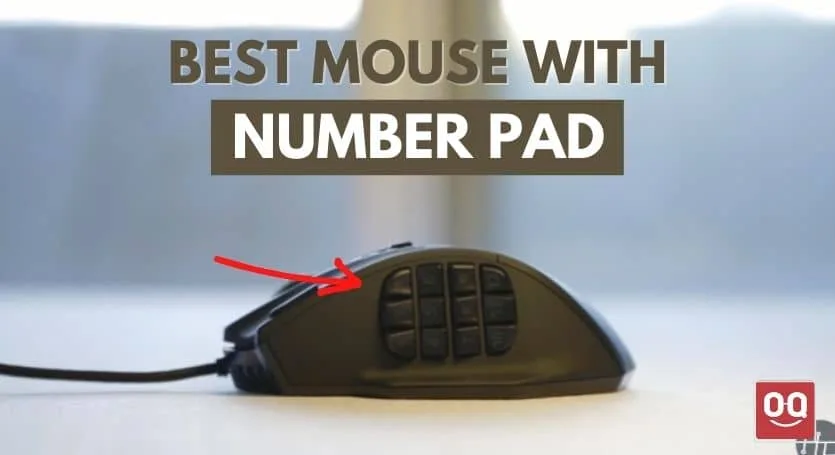
Here’s the honest answer most round-ups won’t give you: a regular mouse with a real, physical 10-key number pad built into it basically doesn’t exist as a current product in 2026. What does exist — and what actually solves the problem people search this for — is either an MMO mouse with a 12-button thumb grid you map to digits 0–9 (Razer Naga V2, Corsair Scimitar Elite), or a compact wireless numpad sitting next to a normal mouse. If you’re entering numbers one-handed, the 12-button thumb grid is our pick: your thumb reaches every digit without your hand leaving the mouse.
What searchers actually want (and the two ways to get it)
The marketing myth here is the category itself. Listings that promise a “mouse with number pad” are almost always either an MMO gaming mouse being relabeled, or a mouse-plus-numpad combo bundle. Neither is a scam — but you should know which one you’re buying.
The spec that decides it: how many keys you need under one hand. Digits 0–9 plus Enter fits an MMO mouse’s 12-button side grid. If you also need Tab, decimal, and the four operators for real spreadsheet work, a 20+ key dedicated numpad wins — no thumb grid holds that many. For serious 10-key work, pair the numpad with a proper board from our guide to the best keyboards for data entry.
The picks
1. Razer Naga V2 HyperSpeed — best one-handed number entry
12 mechanical side buttons in a 3×4 grid — exactly the layout of a phone dial pad, which is why digit mapping feels natural within a day. Razer Synapse lets you bind 1-9, 0, Enter, and Backspace directly; it’s wireless (2.4 GHz or Bluetooth) and runs ~250 hours on a AA battery.
Buy it if: you want digits under your thumb without moving your hand — data entry, MMO skills, or Excel navigation.
Skip it if: you need operators (+ − × ÷) and Tab too; a real numpad handles that better.
Check Razer Naga V2 HyperSpeed on Amazon
2. Corsair Scimitar Elite Wireless SE — best for bigger hands
Same 12-button idea, but Corsair’s Key Slider lets you physically slide the whole side panel 8 mm forward or back so the grid sits under your thumb, not an average one. 26,000 DPI sensor and up to 150 hours wireless. Heavier than the Naga at ~114 g — fine for productivity, noticeable in fast games.
Buy it if: the Naga’s fixed grid has ever felt cramped or too far forward for you.
Skip it if: you want the lightest possible mouse.
Check Corsair Scimitar Elite Wireless on Amazon
3. Redragon M913 Impact Elite — best budget thumb grid
The honest budget route: 12 wireless side buttons, on-board memory for macros, and it typically costs a third of the Naga. The software is clunkier and the side buttons are mushier — you’re trading key feel, not function.
Buy it if: you want to try the thumb-grid workflow before committing real money.
Skip it if: you’ll use it 8 hours a day — the button feel wears on you.
Check Redragon M913 Impact Elite on Amazon
4. Keychron Q0 — best separate numpad (the full 10-key answer)
If what you really need is genuine 10-key — operators, decimal, Tab, Num Lock — stop trying to make a mouse do it. The Q0 is a full-aluminum, hot-swappable mechanical numpad with QMK/VIA remapping. It’s overbuilt in the best way and sits happily to the left of your mouse for one-hand entry.
Buy it if: you do real spreadsheet or accounting volume daily.
Skip it if: you only need digits occasionally — an MMO mouse is cheaper and takes zero desk space.
5. Logitech K400-style budget combo route: any mouse + a Bluetooth numpad
Budget wireless numpads (ProtoArc, TRELC, and similar combo kits) share one USB receiver with a mouse, so you burn a single port. Key feel is membrane-basic, but for occasional invoice entry it’s the cheapest complete solution — often under the cost of one gaming mouse.
It depends: right if you need full 10-key rarely and cheaply; wrong if you type numbers for hours — get the Q0.
Check wireless numpad and mouse combos on Amazon
| Pick | Best for | Why it wins | The catch |
|---|---|---|---|
| Razer Naga V2 HyperSpeed | One-handed digit entry | 12-button 3×4 grid maps to 0–9 naturally; ~250 h battery | No room for operators/Tab |
| Corsair Scimitar Elite Wireless | Larger hands | Sliding side panel positions the grid under your thumb | ~114 g, heavier |
| Redragon M913 | Budget trial | Same 12-button layout for a fraction of the price | Mushy buttons, clunky software |
| Keychron Q0 | Serious 10-key work | Full mechanical numpad, hot-swap, QMK/VIA | Separate device on your desk |
| Numpad + mouse combo kits | Occasional use, lowest cost | One receiver, full 10-key layout | Basic membrane feel |
How to map an MMO mouse’s buttons to a number pad
In Razer Synapse or Corsair iCUE, bind side buttons 1–9 to the numpad digits (not the top-row numbers — spreadsheets treat them differently for some shortcuts), button 10 to 0, and the last two to Enter and Backspace. Turn on-board memory on so the mapping survives a PC change. If your hands are on the smaller side, check our guide to the best ergonomic mice for small hands before buying a wide MMO shell, and browse more options in our gaming mouse section.
FAQ
Is there a mouse with a real built-in number pad?
Not as a mainstream current product. The closest real products are MMO mice with 12 programmable thumb buttons (Razer Naga V2, Corsair Scimitar) that you map to digits, or a compact wireless numpad used beside a normal mouse. Listings promising an integrated numpad mouse are almost always one of these two in disguise.
Can I use an MMO mouse for data entry?
Yes — a 12-button 3×4 side grid covers 0–9 plus Enter and Backspace, and the phone-dial layout takes about a day to learn. It falls short if you also need operators, decimal, and Tab; for that, a dedicated numpad like the Keychron Q0 is faster.
What’s better: an MMO mouse or a separate numpad?
MMO mouse if you want digits without moving your hand and only need 0–9. Separate numpad if you do sustained spreadsheet or accounting work — the full 20+ key layout with operators is meaningfully faster for volume entry.
Do numpad-and-mouse combo kits work well?
For occasional use, yes — they share one USB receiver and cost less than a single gaming mouse. The membrane key feel is the trade-off; heavy daily users should step up to a mechanical numpad instead.

![Read more about the article How Far Do Wireless Keyboards Work [Answered]](https://technoqia.com/wp-content/uploads/2022/05/5-300x163.webp)